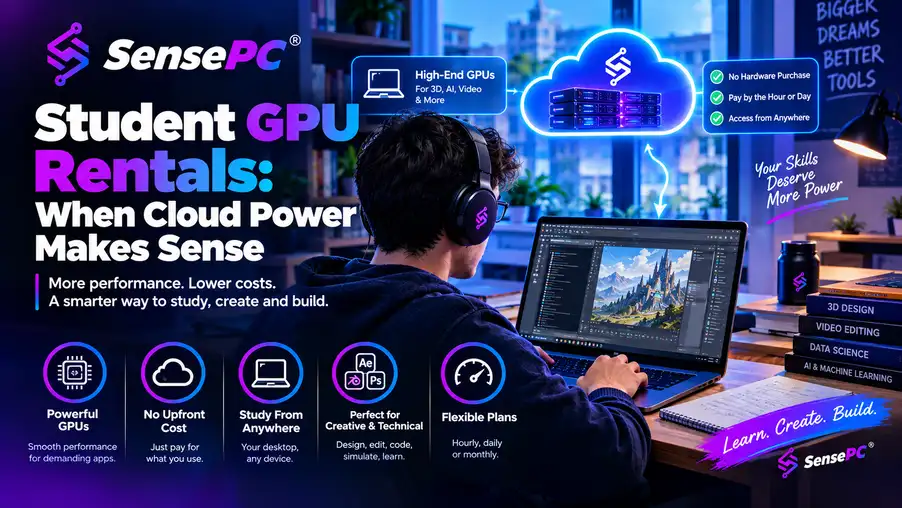
Short answer: A GPU rental makes sense for students when the need is real but temporary — one AI/ML course needing CUDA tools, a capstone project in Unreal Engine or Blender, or a dataset too large for a basic laptop. Hourly access controls cost well for a short, demanding sprint (a project week, a render-heavy deadline). If you need GPU power every evening for a full year, a personal desktop or workstation is usually the better financial fit. Before renting anything, check your syllabus for the exact software, OS, and GPU/memory requirements — "needs a powerful computer" isn't specific enough to size a rental correctly.
The assignment is due Monday, your laptop starts sounding like a small fan heater, and the software your class requires needs more GPU power than you own. Student GPU rentals solve that specific problem: access to a high-performance Windows computer when the work demands it, without buying a costly workstation for one course or one semester.
When Student GPU Rentals Are Worth It
A GPU rental makes the most sense when your need is real but temporary. Maybe you're taking one machine learning course and need CUDA tools for model experiments. Maybe a capstone project involves Unreal Engine, Blender, CAD visualization, or a large dataset that makes your basic laptop struggle. Renting performance for the hours you use can be easier to justify than purchasing hardware that may sit unused after finals.
This model also helps students needing Windows software but using a Mac, Chromebook, or lightweight laptop — your local device becomes the screen and keyboard for a full Windows desktop running elsewhere, so you work from the hardware you already carry to class instead of replacing it for one demanding application.
The cost comparison is less about whether cloud access is "cheap" and more about how concentrated your workload is. A student needing a powerful GPU for 10 hours during a project sprint has a different decision than someone training models every evening for a year. Hourly access controls spending during a short, demanding period; frequent, long-term use may make a personal desktop or workstation the better financial fit. The general rent-vs-buy cost math for GPU workstations covers this trade-off in more depth.
There's also a convenience factor. Building a desktop means comparing parts, waiting for delivery, setting up Windows, installing drivers, and handling repairs or upgrades later. A cloud PC can be ready much faster — with SensePC, create a Windows 11 machine in minutes, select a configuration with dedicated NVIDIA L4 GPU power, and keep files on persistent SSD storage between sessions.
What a Rented GPU PC Can Handle
A cloud GPU PC is most useful when an application benefits directly from graphics acceleration or stronger compute resources — for students, that often means AI and machine learning frameworks, local image-generation workflows, 3D modeling and rendering, simulation tools, game engines, video export, and development environments with heavy builds or containers.
The key benefit isn't simply a GPU listed in the specs — it's having a full Windows environment where you install approved software, save project files, and return to the same workspace later. Persistent storage matters here; without it, you could spend more time reinstalling dependencies and moving files than doing coursework.
For AI learners, a dedicated GPU can make experimentation more realistic — testing a smaller model, running a notebook that would crawl on an integrated laptop GPU, or using CUDA-dependent tools for a class project. That doesn't mean any cloud GPU fits every model or dataset — training needs depend on VRAM, CPU and RAM capacity, storage speed, framework versions, and workload size. VRAM and GPU specs for AI/ML coursework specifically covers this in detail.
Creators face a similar trade-off. GPU acceleration helps with previews, effects, rendering, and 3D scenes, but upload time still matters — hundreds of gigabytes of raw footage may take longer to move into a cloud PC than working from a local editing drive. For a design project, moderate video workload, or render-heavy scene, the balance is usually much better.
Check These Details Before You Rent
Start with your syllabus or project brief. Look for the exact application, required operating system, plugin version, GPU recommendation, storage needs, and submission format — "needs a powerful computer" isn't enough information. A data science assignment may need more system memory; a 3D project may need GPU memory; a software build may be limited by CPU cores or disk speed instead. CAD, simulation, and engineering software specifics matter especially here, including licensing rules for remote use.
Next, think about where you'll connect. A cloud PC sends a live desktop stream to your device, so a stable internet connection is part of the setup — wired Ethernet is often preferable when available, and good Wi-Fi can work well, but crowded campus networks, hotel connections, and weak home signals can affect responsiveness.
Latency matters most for fast visual work, interactive 3D scenes, and games — it's less critical when compiling code, waiting for a render, or running an AI job that takes time regardless of where the screen is displayed. If your classwork is highly interactive, test the service with your own connection before depending on it for a deadline.
Confirm whether your school already provides remote lab access first. Some universities offer virtual desktops or department workstations with licensed software already included — excellent for required class tools, though they may have limited hours, queues, restricted admin access, or fixed configurations. A self-service cloud PC offers more control when you need your own persistent environment, but it may not replace a school license for specialized applications you already have access to for free.
Finally, plan your files: keep a local backup of submitted work, use a clear folder structure in your cloud storage, and don't leave the only copy of a final project in one environment. For team projects, agree on how files, assets, and version control will be managed before everyone starts working.
Student GPU Rentals vs. Buying a PC
Buying a physical PC is still the better move for some students. If you use demanding software almost every day, have a stable workspace, and expect similar needs for several years, ownership provides predictable access with no dependence on an internet connection, plus direct access to local storage, peripherals, and offline work.
The downside is upfront cost and commitment — a capable GPU laptop or desktop can be expensive, laptops are difficult to upgrade, and hardware ages. The GPU that feels generous in your first year may be limiting by your final project.
Student GPU rentals shift that trade-off: pay for access rather than owning equipment, and choose more power for a demanding month without locking into a multi-year purchase. The limitation is equally clear — you need reliable connectivity, and ongoing daily use can add up over time. Matching billing to a single sprint vs. a full semester covers how to think about that trade-off concretely.
Traditional virtual desktop systems through a school or employer are another option, prioritizing managed access, policy controls, and standard software images — useful, but often meaning less flexibility for installing tools or adjusting your environment. A cloud PC built for individual users is usually a better fit when you need a personal Windows workspace with dedicated GPU options and control over your own setup.
A Smarter Way to Use Cloud GPU Time
Treat rented compute like a project resource, not an open-ended subscription you forget about. Build a simple plan around the work that truly needs extra power: use your local device for reading, writing, lightweight coding, and planning, then start the cloud PC when you need to run the model, compile the project, render the scene, or use the Windows-only tool.
Before a work session, gather your files, dependencies, and instructions — install software early rather than five minutes before a deadline. If your course permits it, run a small test project first to learn whether the configuration fits your workflow and whether your connection feels comfortable for the application.
When the heavy work is done, save results, back up important files, and stop the machine according to the platform's billing rules — this keeps usage intentional and helps you understand what each project actually costs.
A powerful computer shouldn't be the reason you skip a course, delay an idea, or settle for a smaller project. If you only need serious GPU performance at specific moments, rent it for those moments and put your budget toward the work that matters.
Is it worth renting a GPU for just one semester?
Often yes, if the need is concentrated — one AI/ML or 3D-heavy course rather than ongoing use across your whole degree. Compare the hours you'll realistically need against the cost of buying and maintaining a GPU laptop or desktop you may not need again for other coursework.
How much VRAM do I need for a machine learning class project?
It depends on the models and dataset size in your specific course — check your syllabus or professor's guidance rather than assuming. Smaller class models and notebook exercises typically need less VRAM than research-scale training.
Should I check with my school before renting a cloud GPU PC?
Yes. Some universities provide free virtual desktops or lab access with the required software already licensed — check this first, since it may cover your coursework needs at no cost, even if it has more limited hours or configuration flexibility than a self-service cloud PC.
What happens to my project files if I stop renting a cloud GPU PC?
With persistent storage, files typically remain as long as your account or subscription is active — but keep your own backup of submitted or critical work regardless, since a cloud environment shouldn't be your only copy of a graded project.
Is a cloud GPU PC good for a capstone project involving 3D or video work?
Yes, generally — GPU acceleration helps with rendering, effects, and 3D scene navigation. The main thing to plan for is file transfer time if your project involves large raw video or asset files, since upload/download time can add up for very large libraries.