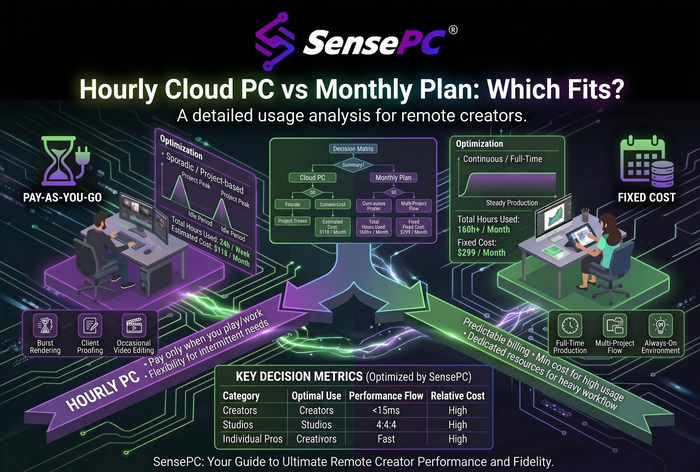
Short answer: Hourly bills compute only while your cloud PC runs (storage bills separately), so it suits short or irregular sessions. Daily covers up to 10 hours in one day. Monthly includes up to 180 hours, enough for 8-hour days across 22 workdays (176 hours). Monthly becomes cheaper once your monthly hours pass its price divided by the Hourly rate.
SensePC bills each cloud PC in one of three ways. This guide explains how each plan charges, when each becomes the cheaper choice, and what happens at the limits. Whether to pay hourly at all instead of buying a gaming PC is covered in hourly gaming vs buying a PC.
How the three plans bill
Every plan draws from your SensePC wallet, and charges are applied upfront at the start of each billing period: the hour, the day or the month. Hourly pricing starts from $0.55 an hour on standard configurations; higher tiers cost more.
| Hourly | Daily | Monthly | |
|---|---|---|---|
| You pay for | Each hour the PC runs, plus SSD storage for as long as the PC exists | One day of access | One month of access at a flat rate |
| Included runtime | No limit | Up to 10 hours that day | Up to 180 hours that month |
| Renewal | Charged from your wallet as you go | Auto-renews by default; you can turn it off | Auto-renews by default; you can turn it off |
| On-demand CPU and RAM resize | Yes | No | No |
| Best for | Short or irregular sessions | Long single days | Regular use |
When Daily or Monthly beats Hourly
Two formulas settle it. Compare the same tier, region and storage size.
- Daily wins when you'll use more hours that day than: Daily price ÷ Hourly rate.
- Monthly wins when you'll use more hours that month than: Monthly price ÷ Hourly rate.
For example, if a Monthly plan costs as much as 80 hours of Hourly use, Monthly wins from the 81st hour and covers you up to 180. If a Daily result comes out above 10 hours, Daily can't beat Hourly for that tier, because it includes only 10 hours. The same applies to Monthly above 180.
| Tier | Hourly rate | Daily price | Monthly price | Daily wins after | Monthly wins after |
|---|---|---|---|---|---|
| Xtreme Core | [$] | [$] | [$] | [ ] h/day | [ ] h/month |
| Xtreme Pro | [$] | [$] | [$] | [ ] h/day | [ ] h/month |
| Xtreme Ultra | [$] | [$] | [$] | [ ] h/day | [ ] h/month |
| AI Dev Core | [$] | [$] | [$] | [ ] h/day | [ ] h/month |
Prices from the live calculator the price shown during PC creation is final.
Storage and other charges
- SSD storage. On Hourly, stopping the PC ends compute charges, but SSD storage keeps billing while the PC exists. Daily and Monthly follow their own billing cycles.
- Sense Cloud. Sense Cloud storage is billed separately each month, based on the highest storage tier you reach in the cycle.
- What it means for a gaming budget. See hourly gaming vs buying a PC.
What happens at the limits
- Daily and Monthly caps. Daily covers up to 10 hours in a day and Monthly up to 180 hours in a month.
- At 180 hours on Monthly. The PC stops, and you can start it again when the next monthly cycle begins.
- After included runtime runs out. Once included Daily or Monthly runtime is used up, an eligible stopped PC can switch to Hourly if your wallet has enough balance.
- Idle time counts. A PC that's running uses runtime whether or not you're at it, so set an idle timeout or a start/stop schedule to protect your allowance.
Switching plans and renewals
- Changing plans. You can start on Hourly and move to Daily or Monthly from Manage Plan on the PC's details page. Upgrades can take effect immediately; downgrades apply after the current billing cycle.
- Auto-renew. Daily and Monthly plans auto-renew by default, and you can turn auto-renew off at any time.
- Resizing. Only Hourly supports on-demand CPU and RAM resizing, so stay on Hourly while you're still finding the right size.
Which plan fits your schedule
| How you use it | Hours | Best plan |
|---|---|---|
| Weekend gaming, two 3-hour sessions | ~24 a month | Hourly |
| A few long study or project days | 9–10 on those days | Daily for those days |
| Part-time freelance, 4 hours a weekday | ~88 a month | Check the Monthly break-even |
| Full-time remote work, 8 hours a weekday | 176 a month | Monthly |
| 10-hour weekdays | 220 a month | Monthly, then Hourly after 180 hours (if eligible) |
Still unsure? Get a plan recommendation.
How other services bill
- Windows 365: a fixed monthly fee per user.
- Amazon WorkSpaces: hourly or a fixed monthly fee per bundle.
- Shadow: mainly recurring subscriptions.
- GeForce NOW: all members are capped at 100 hours a month, with paid top-up blocks beyond that.
SensePC's Hourly, Daily and Monthly options let you match billing to how much you actually use the PC. See how SensePC compares.
What happens when I reach 180 hours on the Monthly plan?
The PC stops, and you can start it again when the next monthly cycle begins. If it's eligible and your wallet has enough balance, you can switch it to Hourly to keep going.
Can I switch from Hourly to Monthly?
Yes. Use Manage Plan on the PC's details page. Upgrades can take effect immediately; downgrades apply after the current cycle.
Do Daily and Monthly plans renew automatically?
Yes, by default. You can turn off auto-renew at any time.
Does stopping my cloud PC stop billing?
On Hourly, compute billing stops but SSD storage keeps billing. Daily and Monthly follow their own billing cycles.
Related: Hourly gaming vs buying a PC · Plan recommendation · Live pricing · Billing FAQ