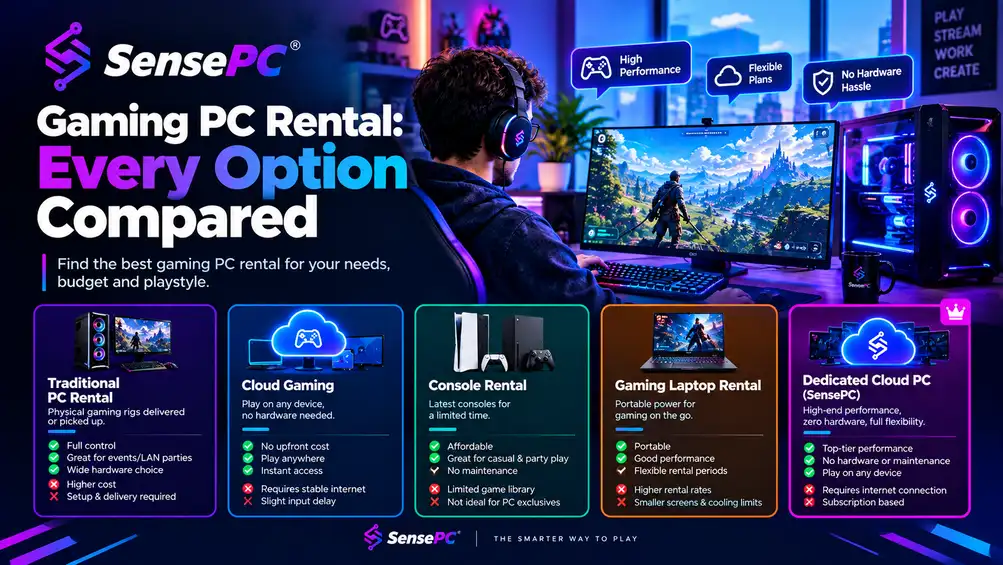
Short answer: "Gaming PC rental" actually covers four distinct things: rent-to-own retail (Rent-A-Center, Aaron's — you eventually own physical hardware, at a higher total cost than buying outright), short-term event rental (trade shows, LAN parties, esports events), gaming laptop subscriptions (HP Omen, NZXT Flex — recurring payment for laptop hardware), and cloud gaming PC services (SensePC and similar — no physical hardware at all, just access to a remote Windows gaming machine billed by usage). Which one fits depends on whether you want to eventually own hardware, need a physical machine for a specific event, or just want gaming performance without owning anything.
A $2,000 gaming PC feels great right up until the next GPU generation drops, a fan starts rattling, or your laptop friends are already playing the same games without buying a tower at all. "Gaming PC rental" gets used to describe several genuinely different things, and picking the wrong category for your actual need is the most common mistake people make researching this.
The Four Categories, Compared
| Category | What you get | Examples | Best for |
|---|---|---|---|
| Rent-to-own retail | Physical hardware, paid off over time, you own it at the end | Rent-A-Center, Aaron's | People without upfront cash who want to eventually own the machine — at a higher total cost than buying outright |
| Short-term event rental | Physical hardware for a fixed period, returned after | eTech Rentals and similar | Trade shows, LAN parties, esports events, game dev demos |
| Gaming laptop subscription | Recurring payment for laptop hardware, often swappable | HP Omen Gaming Subscription, NZXT Flex | People who want a physical laptop without a large upfront purchase |
| Cloud gaming PC | No physical hardware — remote access to a Windows gaming machine | SensePC and similar | People who want gaming performance without owning any hardware at all, billed by actual usage |
Rent-to-Own Retail: What You're Actually Paying For
Rent-to-own retailers let you take home a physical gaming desktop or laptop immediately and pay it off over weeks or months, ending in ownership. The appeal is clear: no large upfront payment, and you walk away owning real hardware.
The honest trade-off: rent-to-own is typically substantially more expensive over time than buying the same machine outright or financing it at low or 0% interest. You're paying for the flexibility of a smaller recurring payment and immediate access, not for a lower total cost. This is worth knowing going in rather than discovering after the fact — it's not a bad option for someone who genuinely can't finance a purchase another way, but it's the most expensive path to ownership on this list.
Short-Term Event Rental: For a Specific Occasion, Not Ongoing Play
Event rental services provide physical gaming PCs or laptops for a fixed, short window — a trade show booth, a LAN party, an esports tournament, a game development client demo. You're not trying to own anything or set up an ongoing gaming habit; you need hardware for days, not months.
This category solves a completely different problem than the other three. If your need is genuinely a single event, this is usually the right fit regardless of what else you read in this post.
Gaming Laptop Subscriptions: Physical Hardware, Recurring Payment
Manufacturer and retailer subscription programs let you pay monthly for a gaming laptop rather than buying one outright, sometimes with the option to upgrade or swap hardware periodically. This sits between rent-to-own and a cloud gaming PC — you still have physical hardware to manage (battery life, thermals, eventual wear), but without the large upfront cost.
This is a reasonable fit if you specifically need a physical, portable gaming machine and want to avoid a big one-time purchase, but it doesn't solve the maintenance, heat, or eventual-obsolescence problems that come with owning any physical device — it just changes how you pay for them.
Cloud Gaming PC: No Hardware, Pay for Access
This is the category that changes the equation most, because it removes physical hardware from the picture entirely. A cloud gaming PC gives you a full remote Windows environment with dedicated GPU power, persistent storage, and game launcher support — you connect from a device you already own (desktop, laptop, even a Mac) and never handle, maintain, or eventually replace any hardware.
The real cost of the alternative (owning a PC)
A gaming PC is not just the initial purchase — it's the tower, possibly the monitor, keyboard, mouse, headset, Windows licensing, storage expansion, cooling, replacement parts, and the occasional upgrade that starts as optional and quickly stops feeling optional. A system that runs new AAA games well today may feel mid-tier much sooner than expected, especially at high settings or higher resolutions. There's also a timing cost: buy during a GPU demand spike and you lock in an expensive asset that starts aging immediately.
Ownership makes the most sense when you play often enough to spread that cost over years of heavy use. The more casual or inconsistent your play time, the worse that value equation gets.
What cloud gaming actually removes
A real cloud gaming setup should include dedicated GPU resources, low-latency streaming, persistent SSD storage, and fast provisioning — without those pieces, it starts feeling temporary and compromised rather than like a real gaming PC. Done right, it removes the biggest pain points of every other category on this list: no rent-to-own markup, no physical hardware to return after an event, no laptop battery or thermal concerns, and no upfront purchase at all. You pay for access to performance instead of possession of hardware. The detailed cost breakdown for hourly cloud gaming covers the specific math.
SensePC is built around this category specifically — on-demand Windows 11 gaming PCs with dedicated NVIDIA L4 GPUs, persistent storage, and hourly-first billing, so cost tracks actual play time rather than a fixed monthly or weekly rental fee.
How to Choose
Ask one question first: do you need physical hardware, or do you need gaming performance?
- If you need a physical machine for a specific short event → event rental
- If you want to own hardware eventually and can't finance it another way → rent-to-own (know you're paying a premium for that flexibility)
- If you specifically want a portable physical laptop without a big upfront cost → laptop subscription
- If you just want to play modern PC games without owning, maintaining, or eventually replacing any hardware → cloud gaming PC
Most people researching "gaming PC rental" are actually looking for the last option and don't yet know it's a distinct category from the physical rental and subscription options that dominate search results. How cloud gaming compares to used PCs, consoles, and budget laptops covers the adjacent comparison in more depth.
Can I rent a gaming PC for a short-term event or just long-term use?
Yes — but the right provider depends on which one you need. Short-term event rental services provide physical hardware for trade shows, LAN parties, or esports events and expect it back afterward. For long-term use, rent-to-own retail gets you physical hardware you eventually own (at a cost premium), while a cloud gaming PC gives you ongoing access without ever owning or returning physical hardware.
What are the benefits of renting a gaming desktop instead of buying?
No large upfront payment, no immediate commitment to hardware that starts aging the moment you buy it, and — depending on the rental type — no responsibility for maintenance, upgrades, or eventual replacement. The specific benefits depend heavily on which rental category you choose: rent-to-own trades a smaller payment for a higher total cost, while a cloud gaming PC removes hardware ownership from the equation entirely and bills based on actual usage.
How does renting a gaming PC from a rent-to-own provider compare to buying one outright?
For most people, buying a gaming PC outright, or financing it at low or 0% interest, is substantially less expensive over time than a rent-to-own service. Rent-to-own gives you immediate access and smaller payments in exchange for a real cost premium — it's a financing tool, not a lower-cost path to the same hardware.