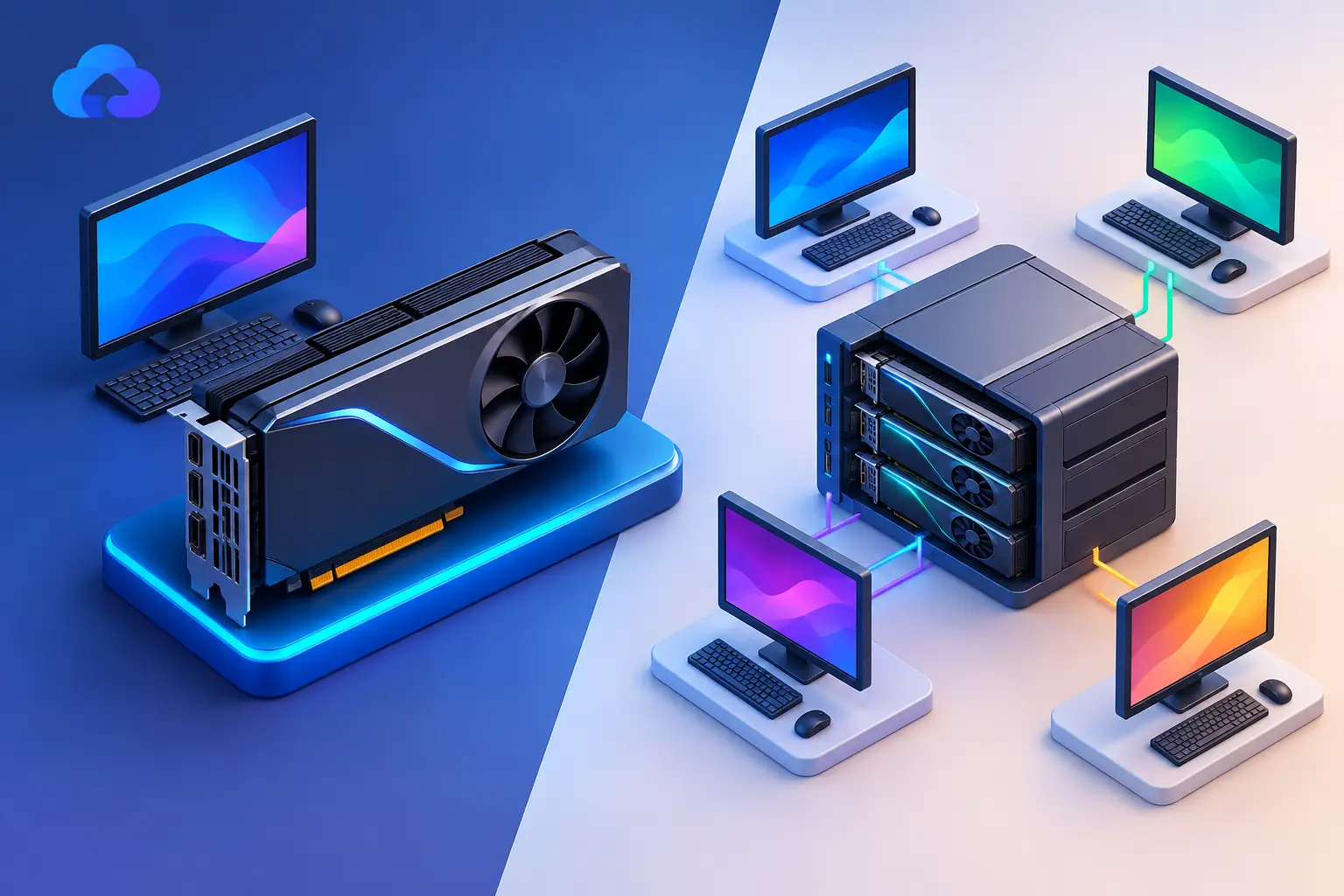
Short answer: A dedicated GPU is a separate graphics processor with its own reserved video memory (VRAM) — it doesn't compete with your CPU or other processes for resources. A shared GPU uses resources that are also used elsewhere: in a physical laptop, that usually means integrated graphics borrowing system RAM; in a cloud environment, it means a virtual machine receiving a portion of a physical GPU shared across multiple users. Dedicated graphics deliver more consistent performance for demanding work (gaming, AI, 3D, video); shared graphics are the smarter, lower-cost choice for everyday computing.
A thin laptop can open a browser, run spreadsheets, and handle video calls without trouble. Ask it to render a 3D scene, train a small AI model, or run a demanding Windows game, and the graphics hardware becomes the limiting factor — that's where the dedicated GPU vs shared GPU decision matters.
What a Dedicated GPU Actually Gives You
A dedicated GPU is a separate graphics processor built for parallel workloads, with its own VRAM — memory reserved specifically for graphics tasks, so your CPU and system RAM aren't carrying the entire visual workload.
That separation matters when an application works with large textures, high-resolution video, complex 3D models, CUDA-based tools, or AI datasets — the GPU keeps more data close to the processor, reducing bottlenecks that appear when graphics work has to compete with the rest of the system.
For a gamer, this means steadier frame rates and better settings in demanding titles. For a creator, faster timeline playback, rendering, and effects processing. For a developer or AI learner, access to GPU-accelerated frameworks and enough video memory for workloads that won't run well on integrated graphics.
A dedicated GPU isn't automatically the answer for every task, though — web browsing, documents, coding in a lightweight editor, and most business apps don't need one. Paying for high-end graphics power to write emails is like renting a production studio to record a voicemail.
What "Shared GPU" Actually Means — Two Different Things
The phrase "shared GPU" gets used in two genuinely different ways, and conflating them is where most confusion comes from.
Shared Graphics in a Physical Computer
On many laptops and budget desktops, integrated graphics are built into the CPU. Instead of dedicated VRAM, the graphics processor borrows part of the computer's regular RAM — commonly called shared graphics memory.
This is efficient for everyday computing and helps manufacturers build thinner, quieter, and more affordable devices. But the GPU and CPU share the same memory pool — under heavy graphics load, that shared resource becomes a constraint. If your laptop has 16 GB of RAM and integrated graphics need a meaningful portion of it, less memory remains for your browser tabs, development environment, or creative application. Performance can drop further when the system starts relying on slower storage-based memory.
Shared GPU in Virtual or Cloud Environments
In cloud computing, "shared GPU" describes something different: a virtual machine receiving a portion of a physical GPU, with multiple users or virtual desktops drawing from the underlying hardware through virtualization.
This can be cost-effective for intermittent graphics needs — lighter 3D workloads, app testing, remote visualization, or business software needing basic GPU acceleration. The trade-off: the GPU isn't fully reserved for one machine, so available performance, memory allocation, and consistency depend on the platform's configuration.
That's different from a cloud PC with a dedicated GPU assigned to your virtual machine — there, the graphics capability is reserved for your session rather than drawn from a broadly shared pool. This is the distinction worth checking for specifically when evaluating any cloud gaming or workstation service, since "GPU access" claimed vaguely can mean either.
Dedicated vs. Shared for Real Workloads
| Workload | Shared/integrated GPU | Dedicated GPU |
|---|---|---|
| Web browsing, documents, light coding | Fine — no need for dedicated | Unnecessary |
| Older/indie/casual games | Reasonable fit | Overkill unless also doing other GPU work |
| Modern AAA games | Struggles at higher settings | Needed for resolution, settings, frame-rate headroom |
| Photo editing, light design | Often fine, especially with a strong CPU | Helps but may not be the main constraint |
| Video editing, 3D rendering, CAD, motion graphics | Limited by shared memory pool | Needed — large timelines and assets require dedicated VRAM |
| AI/ML training, CUDA workflows, image generation | Fine for learning Python, small experiments | Needed for sustained work — VRAM is usually the deciding factor |
Gaming. A shared or integrated GPU handles older games, indie titles, and less demanding games at modest settings — reasonable for casual play. Modern AAA games need more graphics memory, higher rendering throughput, and stronger support for advanced visual features, giving a dedicated GPU much more room to adjust resolution and settings without overwhelming the rest of the system. Cloud gaming adds another factor regardless of GPU type: your internet connection, distance from the data center, and home network conditions all affect the actual experience.
AI development and GPU computing. Dedicated GPU memory is often the deciding factor — models, training data, and image-generation workloads consume VRAM quickly, and a system that looks fast on paper may still hit limits because it can't fit the required workload into available graphics memory. Shared graphics are fine for learning Python, preparing datasets, writing code, and small experiments, but usually not the best fit for sustained CUDA workflows, local image generation, model training, or GPU-heavy frameworks like PyTorch, Stable Diffusion, or ComfyUI.
Video, design, and 3D work. Creative apps vary widely — photo editing and light design can run well on shared graphics, particularly with modest files and a strong CPU. Video editing, motion graphics, 3D rendering, CAD visualization, and effects-heavy projects place more pressure on graphics resources, where dedicated VRAM matters because large timelines, high-resolution footage, and accelerated effects need room to work. If you only edit a project occasionally, owning a workstation-class GPU may be hard to justify — accessing a dedicated-GPU cloud PC for the project can be more practical.
Cost Is More Than the Price of the GPU
A dedicated GPU raises the cost of a physical computer, and can also require a stronger power supply, better cooling, a larger case, or a more capable laptop design — those costs arrive upfront, whether you use the hardware every day or twice a month. Shared graphics avoid much of that expense and make sense for predictable, light performance needs.
The middle ground is on-demand dedicated GPU access — a service like SensePC lets you create a high-performance Windows cloud PC with dedicated NVIDIA L4 GPU configurations, accessed from a Mac, laptop, desktop, or supported browser, with persistent storage keeping project files and installed software available between sessions. This is especially useful when demand comes in bursts: a student completing an AI assignment, a developer testing a GPU feature, a creator finishing a render, or a laptop user needing a stronger Windows environment for a specific project. Billing that matches how often you need dedicated GPU access can keep this cost-efficient.
It's not always cheaper, though — someone using high GPU power for many hours every day should compare recurring cloud costs with the total cost of a local workstation over several years, including electricity, repairs, upgrades, depreciation, and the value of offline access.
How to Choose Without Overbuying
Start with the applications you actually use, not the biggest benchmark you can find. Check whether they use GPU acceleration, which GPU vendor or features they support, and how much VRAM their heavier projects require.
Then consider frequency. Shared graphics are often enough for constant everyday work. A dedicated GPU makes sense when demanding tasks are regular, when graphics performance affects your output, or when you need capabilities integrated hardware can't provide. On-demand cloud GPU access fits users whose needs are serious but not constant.
Also look at the device you already own — a lightweight laptop or Mac can remain your everyday machine while a cloud PC handles Windows-only applications and GPU-heavy workloads, avoiding the need to replace a perfectly good device just because one project needs more power. And be realistic about connectivity: a cloud workstation is only as usable as the network path between you and it, so a stable connection is essential for interactive tasks.
Choose the GPU Model That Matches the Job
Dedicated GPUs are built for dependable graphics resources, higher performance, and reserved video memory. Shared GPUs are built for efficiency, convenience, and lower-cost everyday computing. Neither is universally better — if your work is occasional but demanding, you don't have to buy your way into a new hardware cycle. Keep the device you like, use serious GPU power when the project calls for it, and pay closer attention to the work you need done than the hardware sitting under a desk.
What does "shared GPU memory" mean on a laptop?
It means the graphics processor is integrated into the CPU and borrows a portion of the computer's regular system RAM instead of having its own dedicated video memory. Under heavy graphics load, this shared pool becomes a constraint since the GPU and CPU are competing for the same memory.
Is a shared GPU in the cloud the same thing as integrated graphics on a laptop?
No — they're different concepts that happen to share a name. Integrated/shared graphics on a laptop means the GPU borrows system RAM. A shared GPU in a cloud environment means a virtual machine receives only a portion of a physical GPU, shared with other users or virtual desktops through virtualization.
Do I need a dedicated GPU for gaming?
For older, indie, or less demanding games, shared/integrated graphics can be fine. For modern AAA titles at good settings and resolution, a dedicated GPU is generally needed for consistent performance.
Do I need a dedicated GPU for AI or machine learning work?
For learning, small experiments, and dataset preparation, shared graphics are usually fine. For sustained training, CUDA workflows, or local image generation, a dedicated GPU with sufficient VRAM is typically necessary — VRAM capacity is often the actual limiting factor, not raw processing speed.
How do I know if a cloud PC's "GPU access" is actually dedicated?
Check explicitly rather than assuming — a service should state clearly whether the GPU is reserved for your session alone (dedicated) or drawn from a shared pool across multiple users (shared/virtualized). Vague marketing language like "GPU acceleration" without specifying which model doesn't answer this.